
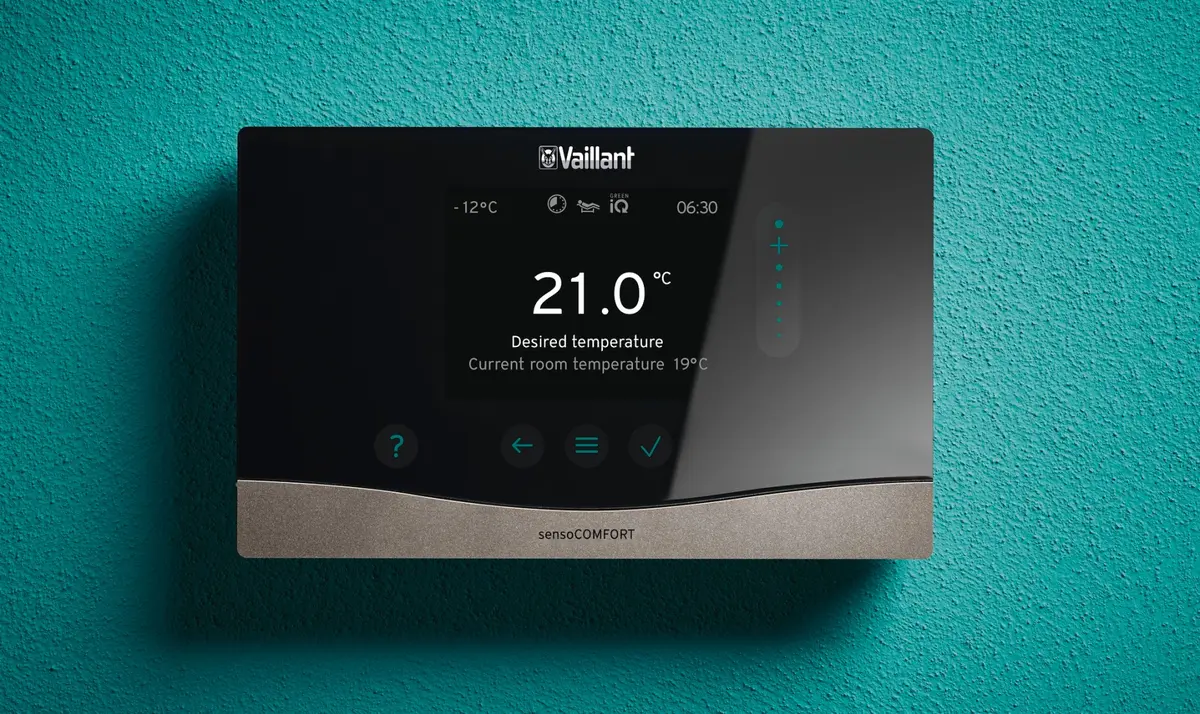
Vaillant sensoCOMFORT
The controller fitted to Vaillant aroTHERM heat pumps. Weather compensation is its most important feature and the single biggest driver of heat pump running costs. Most systems are not fully set up when installed.
More than a thermostat
The sensoCOMFORT is the wall-mounted controller that comes with Vaillant heat pumps including the aroTHERM plus and aroTHERM pro. It handles scheduling, zone control, hot water, and, most importantly, weather compensation.
Many homeowners with a heat pump never get the most from their system because the sensoCOMFORT was not properly commissioned at installation. This guide explains what the controller actually does and how to use it to improve efficiency and comfort.
How to set up weather compensation on your sensoCOMFORT
What is the sensoCOMFORT?
The sensoCOMFORT (model VRC 720, or VRC 720F for the wireless version) is a weather-compensated programmable thermostat designed for complex heating systems. It can manage up to 5 heating zones, integrate solar thermal and renewable products, and connect to the myVaillant app for remote access and energy monitoring. It works with all Vaillant heating appliances, both boilers and heat pumps.
Why weather compensation matters
Heat pumps are most efficient when they run at low flow temperatures, the temperature of the water circulating through your radiators. Efficiency drops as flow temperature rises. Running at 45 degrees instead of 55 degrees can improve your heat pump's COP by 20 to 30% or more, depending on conditions.
The temperature your radiators need varies with the weather. On a cold day at -2 degrees outside, your radiators might need to run at 50 degrees. On a mild spring day at 12 degrees, they might only need 35 degrees. Without weather compensation, the system runs at a fixed flow temperature regardless, meaning it runs hotter than necessary most of the time and cycles on and off as the thermostat controls output.
Weather compensation solves this by measuring outdoor temperature and adjusting flow temperature automatically. The system runs continuously at the right temperature rather than switching on and off. The sensoCOMFORT has a heating curve setting that determines this relationship. Getting the curve right for your home is the most impactful adjustment you can make to your system after installation.
How to commission weather compensation
This is a simplified version of the process. If you are not confident making changes to your system settings, ask your installer to do this, or refer to our full video guide.
Step 1: Remove other controls from the equation
Turn all TRVs and room thermostats to their maximum setting. This stops them interfering with the system while you set the weather compensation curve. You want to see what the heat pump itself is doing without room controls cutting in.
Step 2: Check the heating curve
Find the weather compensation or heating curve setting in the sensoCOMFORT menu. This is a number, or a graph with slope and level settings, that defines how the flow temperature changes with outdoor temperature. If your home is consistently too warm, reduce the curve. If it is too cold, increase it. Make small adjustments and allow the system to run for a day or two before assessing.
Step 3: Set maximum and minimum flow temperatures
Set a maximum flow temperature for your coldest expected outdoor temperature, and a minimum for the mildest. This bounds the curve and prevents the system from running hotter than necessary on mild days.
Step 4: Reintroduce room controls carefully
Once the weather compensation curve is stable, bring TRVs and thermostats back. Use them as temperature limiters, set slightly above your desired room temperature so they only activate if a room starts to overheat. They should not be doing the main work of controlling output. Weather compensation handles that.
Setbacks and zoning
Two common mistakes reduce heat pump efficiency significantly. First, large temperature setbacks: setting a big overnight temperature drop, such as 21 degrees during the day and 16 degrees overnight, effectively turns the heat pump off at night and forces it to work hard to recover in the morning. Heat pumps prefer to run continuously at low output. A setback of 2 to 3 degrees is enough to save energy overnight without the recovery penalty.
Second, aggressive zoning: turning off rooms or zones reduces the radiator surface area available to the system, which forces the heat pump to run at a higher flow temperature to compensate, reducing efficiency. Keep zones open where possible. Use TRVs as limiters, not switches.
The myVaillant app
The sensoCOMFORT can be paired with the myVaillant app via myVaillant connect. The app gives you remote control of heating and hot water schedules, real-time energy monitoring in kWh, system status and alerts, and historical energy data. The energy monitoring is particularly useful: it lets you track the impact of any adjustments you make to the heating curve or setback schedule.
Common questions
Why is my heat pump not running efficiently?
In most cases, the weather compensation curve has not been set correctly, or it has been disabled entirely. Some installers turn weather compensation off to avoid callbacks from customers who feel the system is not warming up quickly enough. This is the wrong approach. A correctly set weather compensation curve produces a stable, comfortable home and significantly better efficiency.
What is the difference between the VRC 720 and VRC 720F?
The VRC 720 is the wired version. The VRC 720F is wireless. Functionally they are identical. The wireless version is easier to install in homes where running a cable to the ideal wall position is difficult.
Can I use a third-party thermostat with a Vaillant heat pump?
You can, but you will lose weather compensation functionality unless the third-party controller specifically supports it. For Vaillant heat pumps, using the sensoCOMFORT is the straightforward way to get the full benefit of the system.
My installer said not to touch the settings. Is that right?
It depends on what they mean. If they have properly commissioned the system and set weather compensation correctly, leaving the core settings alone is reasonable. If they mean the system should be left at its default settings without commissioning, that is not good enough. Default settings are rarely optimal for any specific home.
Quick reference
Key settings on the sensoCOMFORT and what to do with them.
| Setting | What it does | Recommended starting point |
|---|---|---|
| Heating curve slope | Sets how aggressively flow temperature rises as outside temperature drops | Start around 0.6 to 0.8 and adjust based on comfort |
| Heating curve level | Shifts the whole curve up or down without changing its slope | Use to fine-tune after getting the slope right |
| Max flow temperature | Caps the flow temperature for the coldest days | Match to your radiator design temperature, typically 45 to 55 degrees |
| Min flow temperature | Sets a floor for mild weather | 20 to 25 degrees is typical for most systems |
| Night setback | Overnight temperature reduction | Keep to 2 to 3 degrees maximum to avoid recovery penalties |
| Hot water schedule | When the heat pump charges the cylinder | Set to coincide with cheap tariff periods where possible |
| Anti-legionella cycle | Periodic boost to 60 degrees to kill legionella bacteria | Weekly is sufficient for most homes |
Get a free, personalised estimate in seconds